


Leaseholder Portal
A leaseholder portal for managing agents.
Leaseholders see their charges, their statements and their building’s safety record, and report issues — under your organisation’s name, not ours.
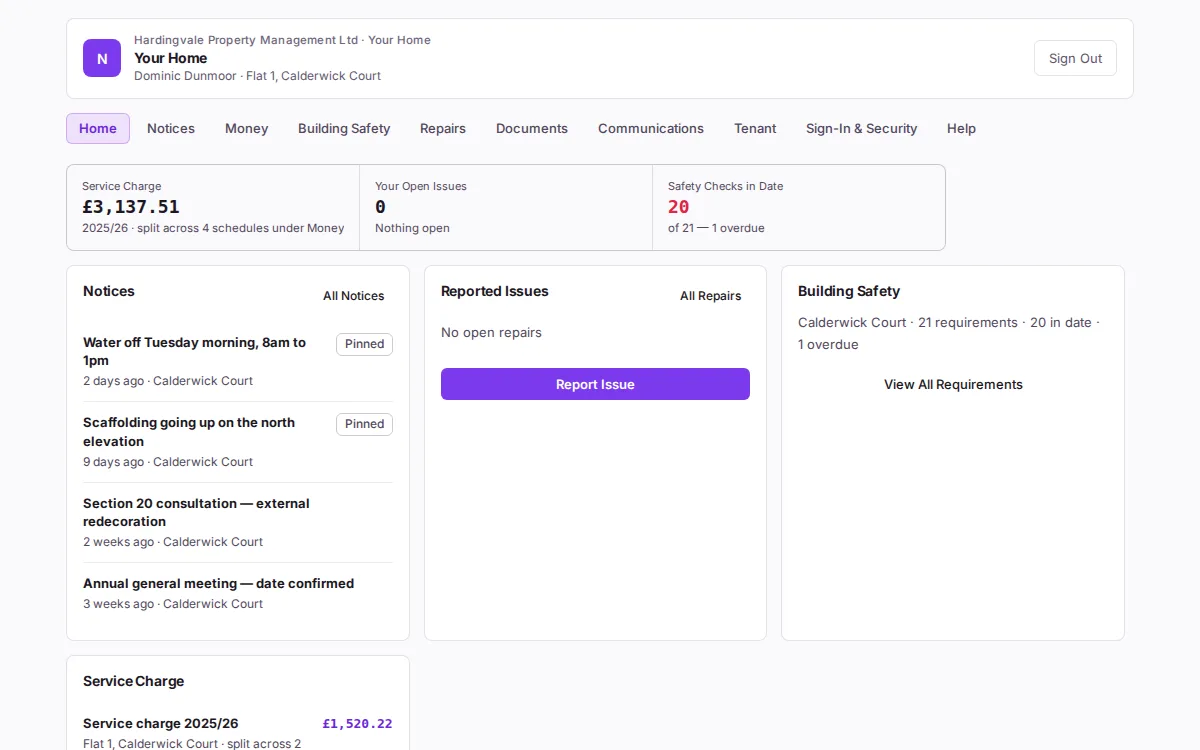
The buildings, people and figures in this picture are a demonstration estate we made up. They are not any agency’s data.
What a Leaseholder Sees
- Their charges. The service charge for the year, by schedule, and their statement of demands and receipts.
- Their building’s safety record. The statutory checks and where each stands — including one that is overdue.
- Their issues. Report an issue, follow what they reported, and see the building’s works. Update emails about their own issues, which they can stop with one link.
- Documents, notices and messages. What you publish to them, the building’s noticeboard, and their conversation with your office.
- Their tenant. A leaseholder who lets their flat can give the tenant access to the Resident Portal themselves.
It is not a copy of your data: it reads the same records your office does, filtered to what that person is entitled to see.
How They Get In
- Your name on it. The portal greets them in your organisation’s name. SynkroTech is your supplier, not theirs.
- Invited, never sent a password. By email, with a link to set their own; or by post, with the address and a one-time code.
- Back in without the office. A forgotten password is a new link, sent from the sign-in page.
- Two-factor authentication with an authenticator app, for anybody who wants it.
- Sign In as Leaseholder. Your staff can see exactly what a leaseholder sees — read only, for 15 minutes, with every page recorded.
The Other Portals
Residents and tenants, the directors of the RMC or RTM company, your contractors and the front desk each sign in to their own portal, reading the same records. Nobody sees another’s.
What It Does Not Do
- No card or direct-debit payments: leaseholders pay by bank transfer, quoting their demand’s reference.
- The portals are a feature your plan switches on, and your quote says whether yours includes them.
The Next Step
We would rather show you the screen than describe it.