


Logging a phone call
What you'll end up with: a record of a phone call (who, when, about what, and what was agreed) on the property's timeline and, if you choose, on a ticket.
Before you start you need: nothing.
A call that is not written up leaves no trace if the leaseholder later says "I rang you about this". Home counts the calls not yet written up, and My Work lists each one under the colleague who placed it, with Complete Call.
- Go to Comms, then Call Log.
- Press Start Call.
- To make the call from here, type the number and press Call (your device's phone) or Teams Call (a Teams meeting that can be transcribed). To write up a call that has already happened, press Record Call.
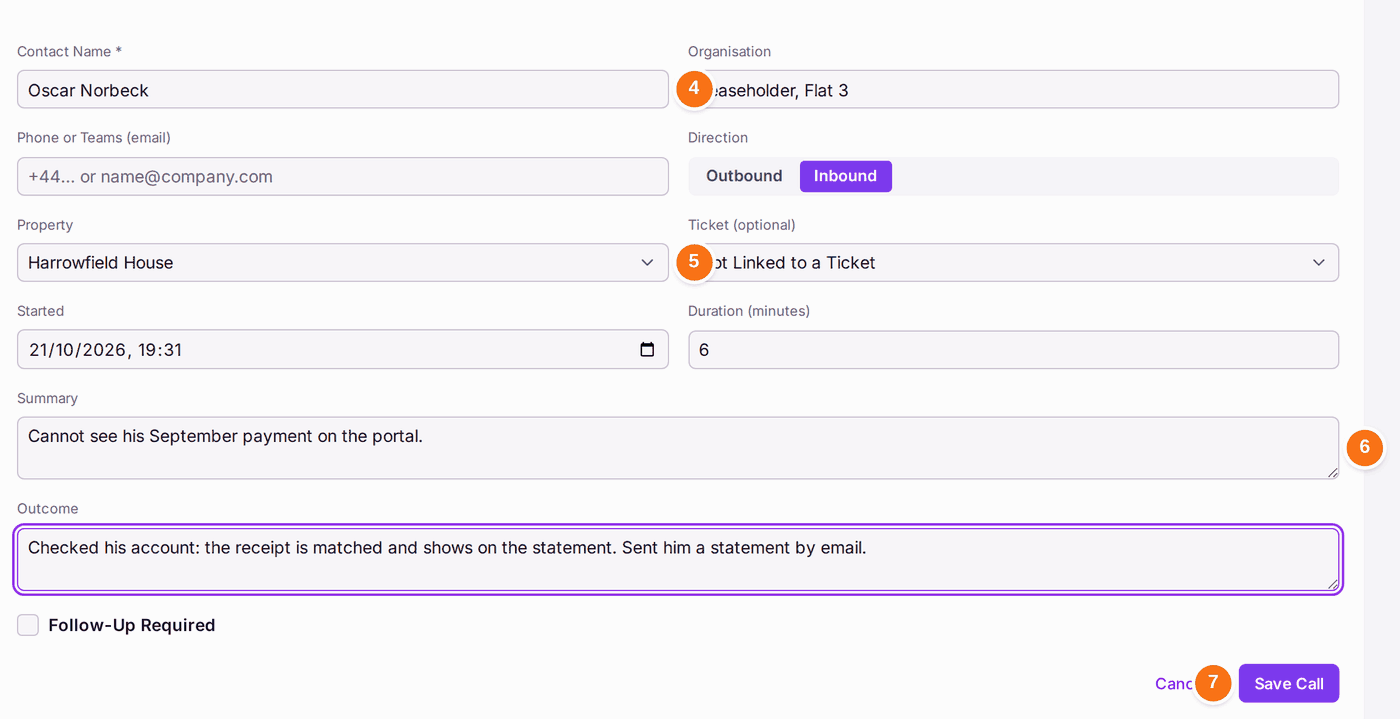
- Type the Contact Name, and their Organisation or role, such as "Leaseholder, Flat 3". Record Call from a work order's Create menu fills the Organisation with the work order's firm, and offers the firm's contact and number; from a ticket, it offers the ticket's reporter and their number. Each offer is marked "From … · check": change it if you spoke to someone else.
- Choose Inbound or Outbound, the Property and, if it is about a repair, the Ticket.
- Type the Summary (what the call was about) and the Outcome (what was agreed, and the next step). Add the Duration if you know it.
- Press Save Call.

You'll know it worked when: "Call logged on the Harrowfield House timeline". The call is at the top of Call History, marked Written Up.
If something's wrong:
- Save Call is greyed. Type the Contact Name first.
- "Microsoft permission required." Teams calls need your Microsoft account's permission. Press Continue to Microsoft and accept, or use Call or Record Call instead.
- You logged the call against the wrong property. Open it from Call History and correct it with Edit Call.